SMS Notifications — Consent & Opt-In
How users consent to receive SMS messages from Penny
- Opt-in flow & consent language (this page): hellopenny.ai/sms-consent
- Privacy Policy: hellopenny.ai/privacy
- Terms of Service: hellopenny.ai/terms
- Screenshot: verification screen (no consent control)
- Screenshot: toggle off
- Screenshot: toggle on
Penny sends recurring SMS only to people who have given explicit, standalone consent to receive them. This page documents how users opt in, the consent language they see, the messages they may receive, and how to opt out.
Two kinds of messages
Penny sends two distinct types of SMS:
- Phone verification codes (one-time passwords). Sent only in direct response to a user clicking "Send code" on the phone verification screen. These are transactional and do not require recurring-message consent. No consent control appears on that screen.
- Recurring account notifications. Sent only to users who have turned on the standalone "Text notifications" toggle in account settings. These include daily family event briefings, schedule changes detected from school and activity emails, new event notifications, and account alerts.
These are kept separate by design. A user can verify a phone and use Penny without ever enabling recurring messages.
How users opt in
Opting in to recurring text messages is a deliberate, standalone action. It is not part of signing up, verifying a phone, or any purchase. There is no SMS-consent control on the phone verification screen — that screen only sends a one-time code:

After verifying, a user can turn on recurring messages with a dedicated Text notifications toggle in account settings. It is off by default, sits on its own row with no transaction attached, and can be switched off at any time.
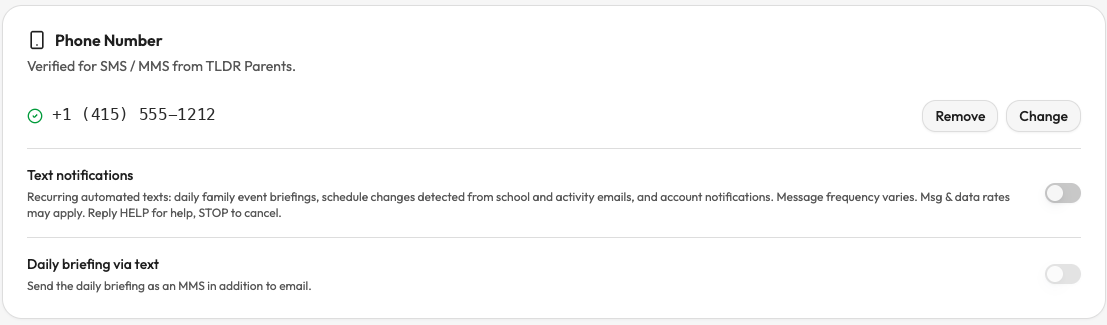
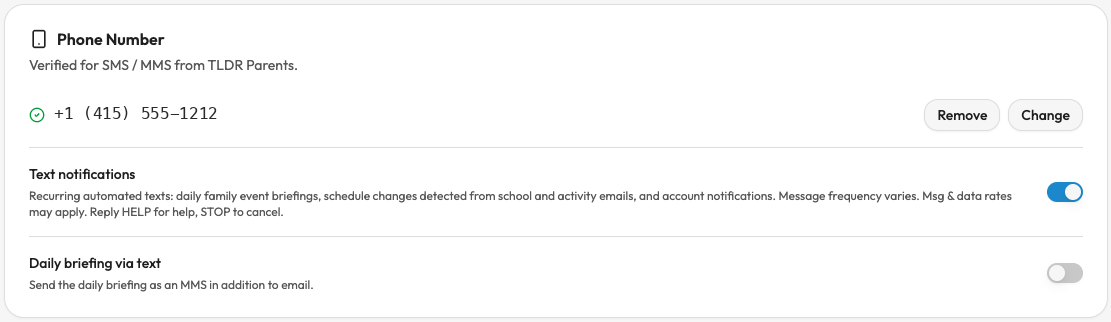
The toggle shows this disclosure:
Recurring automated texts: daily family event briefings, schedule changes detected from school and activity emails, and account notifications. Message frequency varies. Msg & data rates may apply. Reply HELP or email support@tldrparents.com for help, STOP to cancel.
Direct links to our Terms of Service and Privacy Policy appear immediately beside the toggle, on the same screen as this disclosure.
Confirmation message
Users who turn on the Text notifications toggle receive this SMS immediately:
Penny by TLDR Parents: You're subscribed to text notifications (daily briefings, schedule changes, account alerts). Msg frequency varies. Msg & data rates may apply. Reply HELP or email support@tldrparents.com for help, STOP to cancel.
Message categories and frequency
Users who opt in may receive:
- Daily family schedule briefings — once per day, typically in the morning, summarizing the family's upcoming events
- Schedule change notifications — when a previously-detected event is rescheduled, cancelled, or updated based on an incoming school or activity email
- New event notifications — when a new event is added to the family calendar from a school or activity email
- Account notifications — password changes, security alerts, billing notifications, and changes to account settings
Message frequency varies based on the user's family schedule and account activity. No marketing or promotional messages are sent through this program.
Opting out
Users can opt out at any time by:
- Replying STOP, CANCEL, END, QUIT, UNSUBSCRIBE, REVOKE, STOPALL, or OPTOUT to any SMS from Penny
- Turning off Text notifications in account settings at app.hellopenny.ai
When a user turns off the Text notifications toggle, they receive this confirmation:
Penny by TLDR Parents: You've been unsubscribed and will receive no further messages from this number. Reply START to resubscribe, or email support@tldrparents.com for help.
Users who have opted out can resubscribe at any time by replying START, UNSTOP, or YES to any message from Penny, or by turning the Text notifications toggle back on in account settings. After replying START, they receive this confirmation:
Penny by TLDR Parents: You've been re-subscribed to text notifications. Msg frequency varies. Msg & data rates may apply. Reply HELP for help, STOP to cancel.
Help
Reply HELP or INFO to any SMS from Penny to receive:
Penny by TLDR Parents: For help, email support@tldrparents.com. Msg frequency varies. Msg & data rates may apply. Reply STOP to cancel.
For other questions, contact support@tldrparents.com.
Privacy
Phone numbers and SMS opt-in data are not shared with third parties or affiliates for marketing or promotional purposes. See our full Privacy Policy for details on how account data is handled.
Terms
SMS notifications are governed by our Terms of Service. Message and data rates may apply. Carriers are not liable for delayed or undelivered messages.